
gtars tokenizers
Wrapper around gtars-overlaprs for producing tokens for machine learning models.
Purpose
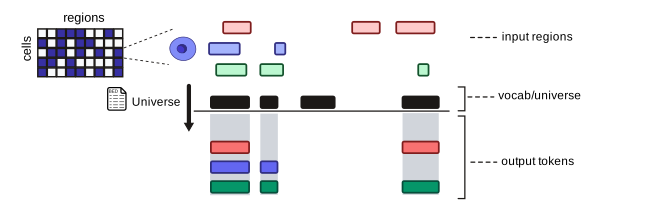
Section titled “Purpose”gtars-tokenizers wraps the core overlap infrastructure from gtars-overlaprs to convert genomic regions into vocabulary tokens for machine learning pipelines. This module is specifically designed for ML applications that need to represent genomic intervals as discrete tokens.
Features
Section titled “Features”- Multiple tokenization strategies configurable via TOML
- HuggingFace integration support
- Configurable tokenization schemes
- Optimized for transformer models and other ML pipelines
from gtars.tokenizers import Tokenizer
# load tokenizer from a BED file (creates vocabulary from regions)tokenizer = Tokenizer.from_bed("path/to/bedfile.bed")
# load from configuration filetokenizer = Tokenizer.from_config("tokenizer_config.toml")
# load pretrained tokenizertokenizer = Tokenizer.from_pretrained("path/to/model")
# tokenize regions from a list of region stringstokens = tokenizer.tokenize(["chr1:1000-2000", "chr2:3000-4000"])
# tokenize regions from a RegionSetfrom gtars.models import RegionSetregions = RegionSet("path/to/bedfile.bed")tokens = tokenizer.tokenize(regions)
# or dirdectly from a BED filetokens = tokenizer.tokenize_from_bed("path/to/bedfile.bed")use gtars_tokenizers::Tokenizer;
// load tokenizerlet tokenizer = Tokenizer::from_bed("regions.bed")?;
// tokenize regionslet tokens = tokenizer.tokenize(®ions)?;Integration with HuggingFace Transformers
Section titled “Integration with HuggingFace Transformers”The tokenizers were designed to be as compatible as possible with HuggingFace Transformers. You can easily integrate them into your ML pipelines.
from gtars.tokenizers import Tokenizer
tokenizer = Tokenizer.from_pretrained("databio/atacformer-base-hg38")
vocab_size = tokenizer.vocab_sizespecial_tokens_map = tokenizer.special_tokens_map
Using a tokenizer from a pre-trained model
Section titled “Using a tokenizer from a pre-trained model”We can also download the universe (vocabulary) for a pre-trained model from huggingface and use that to instantiate our tokenizer.
from gtars.tokenizers import Tokenizer
# identical API to huggingfacetokenizer = Tokenizer.from_pretrained("databio/atacformer-base-hg38")
tokens = tokenizer.tokenize("path/to/intervals.bed")print(tokens)# >>> ["chr1:100-200", "chr1:200-300", ...]
Working with the tokenizer API
Section titled “Working with the tokenizer API”We designed the tokenizer API to be congruent with the Hugging Face Tokenizers library, making it easy to integrate with modern machine learning workflows tailored to genomic data.
Getting input ids
Section titled “Getting input ids”It is common to represent genomic intervals as input ids for machine learning models, particularly for transformer-based architectures. These input ids are typically derived from the tokenized representation of the genomic intervals. You can obtain the input ids from the tokenizer as follows:
from gtars.tokenizers import Tokenizerfrom gtars.models import RegionSet
tokenizer = Tokenizer.from_pretrained("databio/atacformer-base-hg38")rs = RegionSet("path/to/intervals.bed")
tokens = tokenizer(rs)print(tokens["input_ids"])# >>> [101, 202, 111]
Getting special tokens
Section titled “Getting special tokens”Special tokens are integral to the tokenizer's functionality, providing markers for padding, masking, and classification tasks. You can access the special tokens map from the tokenizer as follows:
from gtars.tokenizers import Tokenizer
tokenizer = Tokenizer.from_pretrained("databio/atacformer-base-hg38")print(tokenizer.special_tokens_map)# >>> {'pad_token': '<pad>', 'mask_token': '<mask>', 'cls_token': '<cls>', ...}
Decoding input id's
Section titled “Decoding input id's”For generative tasks, or when you need to convert input ids back to their original genomic interval representation, you can use the tokenizer's decode method:
from gtars.tokenizers import Tokenizer
tokenizer = Tokenizer.from_pretrained("databio/atacformer-base-hg38")special_tokens_mask = tokenizer.decode([101, 202, 111])# >>> chr1:100-200, chr1:200-300, ...